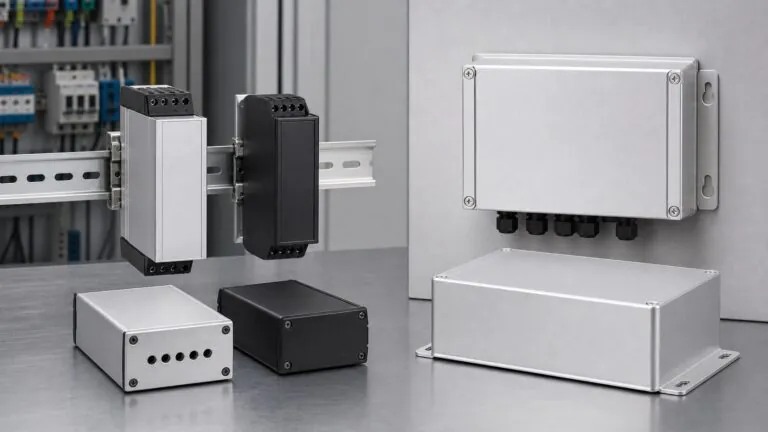
For industrial automation devices, the enclosure is part of the installation system. A PLC module, IoT gateway, sensor controller, power converter, or communication device may operate correctly on the test bench, but still create field problems if the mounting method was selected too late.
Two of the most common options are DIN rail mounting and wall mounting. Both can work with aluminum enclosures, but they serve different installation environments. DIN rail enclosures are usually designed for control cabinets and compact electrical panels. Wall mount enclosures are better suited for equipment frames, outdoor installations, machine sides, and locations where the device needs more independent mechanical support.
This guide explains how engineering and purchasing teams should compare DIN rail and wall mount aluminum enclosures before sending an RFQ to an enclosure manufacturer.
Why Mounting Method Should Be Decided Early
The mounting method affects more than the accessory on the back of the enclosure. It influences the entire mechanical design:
- Rear-wall thickness and screw boss position
- PCB mounting direction
- Connector and cable-entry location
- Internal clearance
- Heat path to the aluminum body
- Gasket and sealing layout
- Installation torque and vibration resistance
- Service access in the field
- Packaging and accessory kits
If the project starts with only outside dimensions, the first sample may need avoidable revisions. For example, a DIN rail clip may block a cable gland, a wall bracket may cover a label area, or the selected enclosure orientation may place heat-generating components away from the main aluminum body.
For this reason, the RFQ should define where and how the finished product will be installed.
What Is a DIN Rail Aluminum Enclosure?
A DIN rail aluminum enclosure is designed to attach to a standardized metal rail, commonly used inside electrical control cabinets and industrial panels. The widely used 35 mm top-hat rail is associated with IEC/EN 60715 mounting rail practice and is common for low-voltage control equipment, relays, terminal blocks, power modules, and automation devices.
DIN rail mounting is common for:
- Industrial IoT gateways inside control cabinets
- PLC expansion modules
- Signal converters
- DIN rail power supplies
- Sensor interface modules
- Data acquisition modules
- Communication and protocol conversion devices
- Compact edge computing or control units
For these products, the buyer usually cares about compact width, fast cabinet installation, clean wiring, and repeatable service access.
What Is a Wall Mount Aluminum Enclosure?
A wall mount aluminum enclosure uses flanges, brackets, rear holes, mounting plates, or external ears to attach the device to a wall, machine frame, outdoor cabinet, pole bracket, or equipment structure.
Wall mounting is common for:
- Outdoor communication boxes
- Industrial wireless gateways
- Machine-mounted control modules
- Power electronics enclosures
- Monitoring equipment
- Security and access-control electronics
- Environmental sensor controllers
- Larger interface boxes with many cable glands
Wall mount designs normally provide more freedom for enclosure size, cable direction, sealing layout, and bracket strength. They are especially useful when the product is not installed inside a dense electrical cabinet.
Main Differences Between DIN Rail and Wall Mount Enclosures
| Decision factor | DIN rail aluminum enclosure | Wall mount aluminum enclosure |
|---|---|---|
| Typical location | Inside control cabinet or panel | Wall, machine frame, outdoor box, equipment body |
| Space priority | Compact width and depth | Installation strength and service access |
| Cable routing | Usually top/bottom cabinet wiring | More flexible side, bottom, or rear entry |
| Load capacity | Limited by clip, rail, and cabinet layout | Depends on bracket, screw size, and wall structure |
| Service access | Good for modular cabinet devices | Good for standalone devices |
| Waterproof design | Usually secondary if inside cabinet | Often more important for outdoor or exposed use |
| Thermal design | Limited airflow in cabinet; compact heat paths needed | More surface area and orientation options |
| CNC customization | Connector openings must avoid rail clip and rear structure | More freedom, but bracket and sealing must be planned |
| Best use case | Compact automation electronics | Standalone industrial equipment and outdoor electronics |
The correct choice depends on installation reality, not only the catalog enclosure size.
When DIN Rail Mounting Is the Better Choice
DIN rail mounting is usually better when the device will live inside a control cabinet or electrical panel with other automation components. It helps system integrators install devices quickly, replace modules easily, and keep wiring organized.
Choose DIN rail mounting when:
- The product is designed for cabinet installation
- The device must sit beside PLCs, relays, breakers, or terminal blocks
- The enclosure must use a narrow or modular footprint
- Wiring will enter from the top or bottom
- The product weight is moderate
- The device does not require frequent outdoor service access
- IP protection is mainly handled by the cabinet, not only the device enclosure
For aluminum enclosures, the rear structure must be designed carefully. The DIN rail clip or bracket needs stable screw positions, sufficient rear-wall strength, and enough clearance from PCB components, grounding points, and cable entries.
When Wall Mounting Is the Better Choice
Wall mounting is usually better when the enclosure is part of a standalone field device. It gives engineers more flexibility for cable glands, external antennas, grounding screws, larger connectors, and service covers.
Choose wall mounting when:
- The device is installed on a machine frame, building wall, pole, or outdoor cabinet
- The enclosure needs IP65, IP67, or IP68 direction
- The product uses several cable glands or waterproof connectors
- The enclosure is heavier or larger than a compact cabinet module
- Service technicians need access without removing nearby cabinet devices
- The design needs external brackets, flanges, or mounting ears
- The product needs more surface area for heat dissipation
For waterproof applications, the bracket design must not damage the gasket path or create leakage points. IEC 60529 defines the IP-code framework for enclosure protection, but real field reliability depends on the completed assembly, including cable entries, connectors, seals, screw torque, and machining quality.
Cable Entry and Connector Layout
Cable routing is one of the most important differences.
In a DIN rail enclosure, the designer usually expects cabinet wiring from the top and bottom. Front-panel access may be needed for LEDs, switches, communication ports, or labels. Rear cutouts must be avoided because the DIN rail clip and rail clearance occupy that area.
In a wall mount enclosure, cable glands and connectors can often be placed on the bottom, side, or front panel. For outdoor or washdown environments, bottom cable entry is often preferred because it reduces water accumulation risk around connectors.
Before quotation, define:
- Connector type and datasheet
- Cable gland size, thread, and washer diameter
- Ethernet, USB, RS485, CAN, power, and antenna positions
- Required connector IP rating after installation
- Minimum clearance from gasket lines
- Whether the cable exits upward, downward, sideways, or rearward
- Whether the technician must access connectors after installation
This information helps the enclosure manufacturer evaluate CNC cutout risk and recommend a practical layout.
Thermal Design Considerations
Aluminum enclosures are widely used for industrial electronics because aluminum can provide mechanical strength, corrosion-resistant finishing options, and useful heat spreading. However, the mounting method changes how heat leaves the device.
For DIN rail devices, the enclosure is often surrounded by other cabinet components. Airflow may be limited, and several heat-generating devices may be installed close together. The design should control component placement, internal heat paths, and enclosure orientation.
For wall mount devices, the enclosure may have more exposed surface area and more freedom for fins, ribs, or larger profiles. This can help power electronics, wireless gateways, and control modules that generate more heat.
Useful thermal design checks include:
- Place high-heat components near the aluminum body
- Use thermal pads or contact surfaces when needed
- Avoid placing heat sources only on removable covers
- Check whether the mounting bracket blocks heat-spreading surfaces
- Confirm cabinet temperature, outdoor sun exposure, and duty cycle
- Keep enough internal clearance around power components
Thermal design should be discussed before CNC machining and sample production, not after the first enclosure is assembled.
Waterproof and Environmental Protection
DIN rail devices are often protected by the cabinet around them, so the enclosure itself may not need the same outdoor protection as a field-mounted box. Wall mount devices are more likely to face dust, moisture, washdown, rain, condensation, vibration, or UV exposure.
For wall mount waterproof enclosures, review:
- Gasket material and compression
- Screw spacing around the cover
- Cable gland sealing surface
- Connector IP rating after assembly
- Drainage direction and installation orientation
- Surface finish for corrosion resistance
- Whether mounting holes are inside or outside the sealed area
NEMA is a major standards organization for North American electrical equipment discussions, including enclosure-related standards and technical publications. For export buyers, IP and NEMA terminology should not be treated as simple one-to-one substitutes. The buyer should specify the target market, installation environment, and required testing basis.
Mechanical Strength and Vibration
Industrial automation devices may be installed near motors, pumps, moving equipment, production lines, vehicles, or outdoor structures. Vibration can loosen screws, stress cable glands, and fatigue mounting points.
For DIN rail designs, evaluate:
- Rail clip material and retention force
- Enclosure weight
- Center of gravity
- PCB support near heavy components
- Clearance from neighboring cabinet devices
- Whether a secondary screw or latch is needed
For wall mount designs, evaluate:
- Bracket thickness
- Screw size and hole position
- Load direction
- Distance from enclosure body to mounting surface
- Reinforcement around mounting holes
- Whether the bracket is outside the sealed area
If vibration is expected, the RFQ should clearly state the installation environment. This helps the supplier avoid treating the enclosure as a simple indoor box.
CNC Machining and Customization Differences
Both DIN rail and wall mount aluminum enclosures can be customized with CNC machining, anodizing, powder coating, silk screen printing, laser engraving, and accessory assembly. The main difference is where the machining can safely be placed.
For DIN rail enclosures, CNC layout must account for:
- Rear clip clearance
- Cabinet wiring direction
- Front-panel LED or port visibility
- Internal PCB rail or slot position
- Screw bosses for DIN rail accessory mounting
- Minimum wall thickness around cutouts
For wall mount enclosures, CNC layout must account for:
- External bracket clearance
- Waterproof gasket path
- Cable gland spacing
- Connector tightening tool clearance
- Screw access after installation
- Label and logo placement
Procurement teams should send drawings early. PDF is useful for dimensions, DXF or DWG is useful for 2D cutouts, STEP is useful for 3D interference review, and connector datasheets help confirm real installation fit.
RFQ Checklist for Buyers
Use the following checklist before requesting a custom aluminum enclosure quotation:
| RFQ item | Why it matters |
|---|---|
| Mounting method | Defines DIN rail clip, wall bracket, flange, or rear holes |
| Installation location | Controls waterproof, thermal, and vibration requirements |
| Device weight | Helps evaluate clip or bracket strength |
| PCB size and height | Confirms internal clearance and boss position |
| Connector list | Drives CNC cutouts and cable-entry planning |
| Cable direction | Avoids interference with rail, bracket, and service access |
| IP or NEMA target | Clarifies environmental protection expectation |
| Surface finish | Affects corrosion resistance, appearance, and logo marking |
| Quantity plan | Separates prototype, pilot run, and production pricing |
| Drawing files | Reduces sample revision and interpretation risk |
| Accessory list | Confirms screws, clips, brackets, gaskets, and cable glands |
A complete RFQ allows the supplier to quote faster and reduces the chance that the first sample will need structural changes.
How PUMAYCASE Supports Custom Mounted Enclosure Projects
PUMAYCASE manufactures aluminum electronic enclosures, tube extrusion enclosures, instrument chassis, 19 inch rackmount chassis, amplifier boxes, waterproof enclosures, and CNC-machined enclosure parts for B2B export customers.
For DIN rail and wall mount industrial enclosure projects, PUMAYCASE can support:
- Existing aluminum enclosure profile selection
- Custom length cutting
- DIN rail clip or bracket review
- Wall mounting flange or rear-hole planning
- CNC connector holes and panel cutouts
- Waterproof enclosure customization
- Anodizing, powder coating, brushing, and printing
- Custom logo, silk screen, and laser engraving
- Prototype samples and batch production
- Engineering review from drawings, samples, photos, or early dimensions
For many industrial automation projects, starting from an existing extrusion profile can reduce tooling cost and shorten the sample cycle. Fully custom structures can also be reviewed when the application requires a special mounting method, connector layout, waterproof direction, or thermal profile.
Final Selection Guide
Choose a DIN rail aluminum enclosure when the device is compact, cabinet-mounted, wired with other automation components, and designed for fast panel installation.
Choose a wall mount aluminum enclosure when the device is standalone, exposed, heavier, connector-rich, waterproof, or installed on a machine frame, wall, pole, or outdoor equipment structure.
The best enclosure is not the one with the most accessories. It is the one that fits the real installation environment, protects the electronics, supports wiring and maintenance, controls heat, and can be manufactured consistently at the required quantity.
For custom DIN rail or wall mount aluminum enclosures, send your enclosure size, PCB layout, connector list, mounting requirement, finish requirement, drawings, and sample quantity to PUMAYCASE for engineering review and quotation.
FAQ
Is a DIN rail aluminum enclosure suitable for outdoor installation?
Usually, DIN rail enclosures are used inside control cabinets. Outdoor use may be possible only if the complete installation provides suitable environmental protection, including enclosure sealing, cable entries, cabinet protection, and corrosion-resistant surface finish.
Can a wall mount aluminum enclosure also include a DIN rail inside?
Yes. Some larger wall mount enclosures can include an internal DIN rail for terminal blocks, power modules, relays, or control components. The external mounting method and internal component mounting should be planned together.
What drawings should I send for DIN rail or wall mount customization?
Send PDF drawings for dimensions, DXF or DWG files for panel cutouts, STEP files for 3D review, PCB size, connector datasheets, installation orientation, and any bracket or clip requirement.
Which option is better for waterproof aluminum enclosures?
Wall mounting is often more practical for waterproof field devices because it allows more freedom for cable glands, brackets, gasket design, and installation orientation. However, the final choice depends on the application environment and complete assembly design.
Can PUMAYCASE customize both DIN rail and wall mount aluminum enclosures?
PUMAYCASE can review custom aluminum enclosure projects with CNC cutouts, surface finishing, logo marking, accessory planning, and prototype-to-batch production support. Buyers should send drawings, photos, dimensions, quantities, and installation requirements through the PUMAYCASE contact page.